Barcode and labelling errors are a hidden expense in logistics and manufacturing.
Audits estimate that labelling issues cause 10-20% of all shipping and inventory errors. Most losses come from poor barcode quality, wrong data formats, or unsuitable materials.
When a barcode fails to scan, the problem spreads fast. Dispatches stall, automation stops, and retailers issue chargebacks. A single faulty pallet label can block an entire shipment.
Labelling issues start with bad assumptions, like believing all printers produce equal quality, or that once a label prints, it works forever.
They don’t. And that misunderstanding costs money.
The rest of this article breaks down the most expensive misconceptions about barcode and labelling systems and shows how to fix them before they drain your budget.
A barcode stores data in a printed pattern that scanners translate into information. Each type, like Code 128, EAN-13, GS1-128, QR Code, etc, has its own format and standard.
Choosing the wrong barcode type leads to unreadable or misinterpreted data, even if the label looks fine.
When labels use an incorrect symbology or field format, automated systems reject them. Warehouses stop processing, shipments wait, and staff waste time relabelling products.
In tightly timed operations, delays mean missed deliveries and penalty charges.
The solution is simple.
Always match your barcode type and data structure to the standards your customers and systems require.
Barcode print quality, longevity, and quality vary by printer type.
Thermal transfer printers use heated ribbons to melt wax or resin onto labels, producing sharp, durable results. Direct thermal printers cost less and print faster, but fade within 6-12 months from heat, light, and age.
Laser printers handle paper documents with barcodes, but fail in production environments. Lasertoner flakes under abrasion, barcodes consume six times more toner than text, sheet-fed operation creates waste, and the printers reject synthetic media required for moisture, chemicals, or temperature extremes.
Print resolution also matters. The minimum resolution for barcode recognition is 150 DPI, but 203 DPI is the industry standard and works for most shipping labels and standard barcodes. 300 DPI is the minimum for small fonts, dense barcodes, or printing codes of smaller sizes with the same data.
A 300 DPI printer can produce readable QR codes 50 per cent smaller than 203 DPI. 600 DPI is mandatory for electronics, jewellery, and pharmaceutical labels.
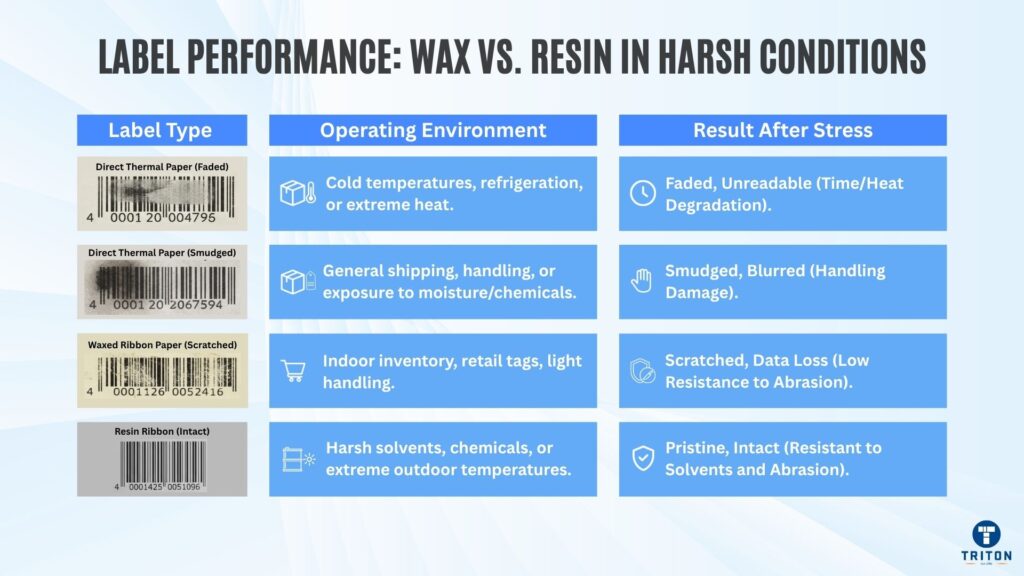
ISO/IEC 15416 grades barcodes from A to D and F (no E grade), and anything below C risks rejection.
Visual checks are unreliable. A barcode that looks fine can still fail a scan if contrast, spacing, quiet zones, etc., are off.
Keep equipment aligned and clean, replace worn printheads, use matching ribbons and label stock, and verify output before printing in bulk.
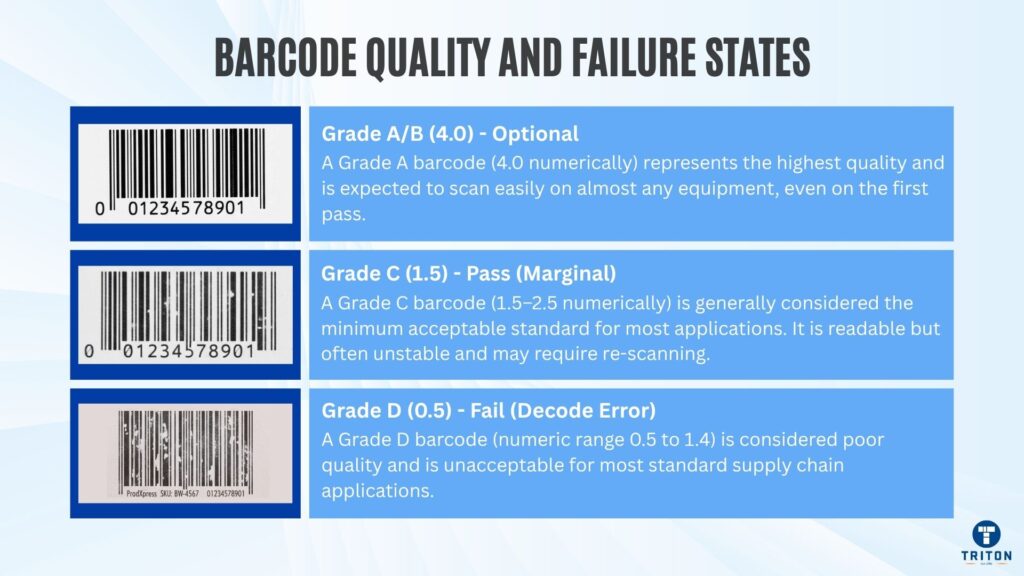
Labels degrade, and environmental exposure determines how fast they degrade.
Heat darkens direct thermal labels, making text unreadable. Moisture smudges ink. Chemicals dissolve adhesives. Sunlight breaks down coatings, and abrasion wears through print layers.
Cold storage presents different challenges. Labels become brittle, adhesives lose grip, and condensation causes peeling when stock moves between temperature zones.
Thermal transfer printing extends lifespan only when the ribbon type matches the label material and conditions.
Wax ribbons work for indoor shipping and retail. They cost less but scratch easily and have poor chemical resistance.
Wax-resin ribbons print well on semi-gloss paper and light synthetics. They resist moderate chemical exposure, temperature shifts, and handling. Applications include pharmaceutical labels, food packaging, and warehouse inventory, where durability matters more than cost.
Resin ribbons can withstand harsh conditions. They are used for outdoor equipment tags, automotive parts, chemical drums, and anything that faces solvents, extreme temperatures, or heavy abrasion. They bond with synthetic materials like polyester and polypropylene. They’re expensive but necessary when labels must remain eligible for years.
Mismatched combinations fail predictably. Wax ribbon on synthetic stock produces weak adhesion. Resin on plain paper is wasteful because paper labels are cheap and fail first.
Wrong materials mean expensive prints, reprints, downtime, and compliance failures.
Specify label construction based on actual conditions, not assumptions, and test samples in your environment before committing to bulk orders.
Software controls the fields and bridges the data and the label.
A barcode that scans but displays incorrect product data creates inventory chaos. The system thinks it received Product A when the warehouse holds Product B.
Manual data entry introduces errors at predictable rates. Studies show that human error rates in data entry range from 1-5% depending on complexity and operator fatigue.
In a facility printing 10,000 labels daily, that’s 100-500 defective labels every shift. One mistyped digit corrupts the entire batch when templates auto-populate from bad source data.
Field mapping failures occur when software pulls data from the wrong database column. Labels display supplier codes instead of product SKUs. The barcode scans perfectly, but inventory records link to the incorrect item. The problem surfaces weeks later during cycle counts or customer complaints.
Direct ERP or WMS integration eliminates manual triggers. Software like BarTender connects to live databases, prints on demand, and logs every transaction. When warehouses receive stock, the software auto-generates labels using verified product data.
No typing. No delays. No need for human interpretation.
Version control stops old templates from printing.
Imagine this.
Label formats get updated, but someone in shipping still has the old template on their workstation. Now products ship with outdated information.
Universal low-code platforms let non-technical staff manage templates without developer support, cutting deployment time from weeks to hours.
Print speeds increase 30-50% when software integrates directly with printer firmware. The printer receives optimised data streams formatted for its specific printhead and resolution.
Retrofitting software after deployment costs more than a proper initial setup. Relabelling inventory wastes labour hours. Database mismatches require IT resources to fix. Customer chargebacks hit profit margins directly when scanning failures reach retail.
Lock templates to prevent unauthorised changes. Link data sources to eliminate manual entry. Update software when systems change.
Reliable data flow matters more than attractive labels.
Barcode and labelling compliance changes constantly.
For example, in 2024, GS1 released Version 24 of its “General Specifications”, which has grown to 509 pages. Regular updates address everything from 2D barcode placement to new Application Identifiers for temperature requirements. A label that passed inspection last might fail today.
Companies printing millions of labels need updated templates, new printer configurations, and revised quality checks.
Application Identifiers determine how automated systems read barcode data. Fixed-length element strings must appear before variable-length ones in a barcode symbol. Get the order wrong, and warehouse scanners misinterpret product codes as batch numbers: the barcode scans, but inventory links to incorrect items.
Major retailers issue chargeback penalties ranging from 1% to 5% of invoice value for non-compliant shipments. Walmart charges 3% of the item value through its On-Time in Full programme for late or missing products.
Barcode scanning errors at distribution centres often trace back to third-party packaging providers not following the correct GS1 labelling standards. This problem is solved by switching to a certified label provider.
Schedule verification checks quarterly and reviews templates after software updates. Subscribe to standard updates from industry bodies and test samples before bulk production.
Compliance prevents interruptions and should be treated as operational insurance, not paperwork.
Cramming every detail onto a label reduces scanning accuracy.
Incorrect quiet zones are a frequent source of scanning problems. Scanners struggle to identify code boundaries when text crowds barcodes.
Overcrowded designs reduce barcode contrast, shrink prints below readable thresholds, and compress spacing.
Quiet zones should remain free of all printing or graphics to allow scanners to locate and read symbols correctly.
Barcodes need breathing room. GS1 requires quiet zones at least 10 times the X-dimension in width for linear barcodes. GS1 DataMatrix requires 1X quiet zones on all sides, whilst QR codes require 4X. Data must be at least 3mm high and clearly legible.
Clever label design uses clear hierarchy, high contrast, and balanced whitespace.
The best colour combination uses black bars with white backgrounds and quiet zones.
Follow GS1 layout guidelines for element spacing, quiet zones, and minimum sizes.
Centred barcodes help ensure quiet zones remain respected.
Improper printer settings rank among the top causes of printing quality decline. Users blame the printer when barcode quality drops, but hardware is rarely the problem; the hardware setup is.
Software rendering issues may crop up when converting or displaying files with barcodes. Margins and alignment mismatches distort barcodes during printing.
When the label’s dimensions do not match the design file, the barcodes can get squished, stretched or clipped.
Outdated printer drivers misinterpret print commands, creating broken or fuzzy images.
Incorrect settings for print speed, darkness, and temperature must align with label material and printer specifications.
Minor data errors from connected systems distort the print data. Misalignment across sheets indicates improper calibration.
Replacing hardware without fixing workflow issues wastes money.
Routine system checks prevent most failures. Methodically work through the print system, verifying each part functions correctly.
Review printer drivers, label templates, and data links after software updates and train operators to spot design mismatches before runs.
Track error logs and print metrics to find recurring faults early.
Many “printer” problems start in software. Fix the source, and the hardware performs exactly as expected.
Low-cost labels look like savings until they fail.
Cheaper labels use weak adhesives, uneven coatings, and inferior quality liners. These labels peel off, fade fast, or leave residue on printheads.
Buildup of thermal ribbon or media coating on printheads causes overheating and eventual failure. Printhead costs account for more than one-third of total printer cost, and replacing a single printhead costs several hundred dollars.
Savings from cheaper media disappear when printheads need replacement.
The real expense isn’t in the label roll. When labels fail, printers stop, stock gets wasted, and staff reprint everything. Each interruption costs production time and slows dispatch. Across a busy line, those minor stoppages add up to hours of lost output.
Judge labels by total cost of ownership, not price per roll. Thermal printheads typically need replacement after printing 2-3 million linear inches.
Reliable materials protect equipment, reduce waste, and run operations without interruption.
Choose tested media that matches the printer specifications and the environment.
A successful scan doesn’t prove a barcode meets quality standards. Verification confirms that barcodes meet the technical standards for global readability across GS1, healthcare UDI systems, and automated logistics.
ISO/IEC 15416 requires 10 scan lines taken across the barcode height, with each line independently graded.
The seven quality parameters are: minimum reflectance, decode capability, edge contrast, symbol contrast, modulation, defects, and decodability. The lowest graded parameter becomes the overall grade for each scan line. Ten scan lines get averaged to produce the final grade.
Barcodes receive grades from A to D and F. Anything below C fails minimum acceptance standards.
A code that scans locally might fail elsewhere on different equipment or under different conditions.
Verification uses dedicated hardware that measures print contrast, edge definition, and dimensional accuracy. Testing identifies problems before mass printing, not after distribution.
Without verification, compliance is guesswork. Catching a bad label early costs pennies. Catching it after shipping costs thousands.
Always verify before bulk production runs.
Scanner technology determines what codes get read. Linear scanners use a laser or an LED to read 1D barcodes like Code 128 or EAN-13. They cannot decode 2D codes like QR or Data Matrix, which require image-based scanners using cameras.
Reading distance is important. Standard handheld scanners work from 5 to 50cm, depending on barcode density and scanner specification. Dense barcodes with small X-dimensions need scanners with higher resolution.
A 5-mil barcode requires a scanning capability different from a 20-mil code.
Scan angle affects success rates. Most scanners need the barcode perpendicular to the scan beam within 30 degrees of centre. Beyond that, read rates drop.
Wrong scanner choices cost money twice. First in the purchase, then in failed reads.
Match scanner specifications to barcode types, working distances, and operational conditions before purchase.
Placement determines whether automated systems read labels successfully. Barcodes on curved surfaces distort when stretched across cylindrical products. The curvature changes bar width ratios, causing decode failures even when print quality meets standards.
GS1 specifies minimum distances from package edges. Barcodes need at least 50mm from vertical edges to avoid damage during handling and storage. Placement too close to seams or folds creates scanning dead zones where readers fail consistently.
Conveyor systems require specific orientation. Barcodes must align with scanner positions-typically horizontal for overhead scanners, vertical for side-mounted units. Wrong orientation forces manual intervention, slowing throughput.
Multiple barcodes on one surface create conflicts. When scanners detect several codes simultaneously, they either read the wrong one or fail. Products with shipping labels and retail barcodes need deliberate placement separation.
Industrial barcode printers for pallet labels position codes 400-800mm from the base. Outside this range, forklift-mounted scanners misread.
Test placement in actual conditions before approving label designs.
Warehouse testing doesn’t predict retail performance. Warehouses typically use 660nm red LED scanners with controlled lighting. Retail checkout scanners often use different wavelengths and omnidirectional reading patterns. A barcode passing warehouse tests fails at the point of sale because the scanning technology differs.
Lighting changes everything. Fluorescent warehouse lighting provides consistent illumination. Retail environments mix natural daylight, LED spots, and fluorescent tubes. Barcode contrast that works indoors fails under direct sunlight, where glare washes out print.
Temperature affects both labels and scanners. Direct thermal labels darken in heat, reducing contrast. Scanner electronics drift in extreme cold. Testing at 20°C proves nothing about performance at -25°C in cold storage or 40°C in shipping containers.
Movement introduces new failure modes. Static testing misses issues when conveyors run at 2 metres per second. High-speed sortation systems need verification that is different from that of handheld scanning.
Test barcodes in every environment where they’ll be scanned, not just one.

Operator errors cause 30-40% of labelling problems organisations blame on equipment. Untrained staff load media incorrectly, adjust settings randomly, and ignore warning indicators until failures escalate.
Proper loading techniques prevent most printer jams. The media must thread through specific guides with correct tension. Loading backwards wastes entire rolls. Misaligned printheads damage both the head and labels.
These mistakes consume more time fixing than training would take.
Operators need to recognise quality problems before printing thousands of bad labels. Faded print indicates low ribbon ink-out or worn printheads. Vertical lines signal printhead contamination. Spotting these early saves material costs and prevents unreadable label distribution.
Maintenance awareness extends equipment life. Knowing when to clean printheads, how to handle ribbons, and which adjustments operators should never touch prevents expensive service calls.
Trained staff know when to escalate issues versus attempting fixes. This judgment prevents minor problems from becoming production shutdowns.
Train every operator who touches printing equipment. The investment pays back within weeks through fewer errors and less downtime.
Small barcode mistakes create big, expensive problems. Wrong formats, poor materials, or skipped verification disrupt entire supply chains. Each error multiplies through wasted labour, rejected shipments, and lost trust.
Barcode accuracy is the cheapest way to protect efficiency and reputation.
Well-configured barcode systems pay for themselves through smoother operations, fewer delays, and cleaner data flow from warehouse to customer.
Start with the basics. Audit current labelling processes. Train staff on standards. Review materials and software settings and eliminate costly barcode mistakes by choosing verified labelling systems, durable media, and expert support.
Visit Triton Store to explore professional barcode printers, printheads, scanners, and labelling solutions.